Individual
Corporate
About Us
  • Our Mission
  • Core Value
  • News
  • English
    • English
    • Kiswahili
  • Login
  • Home
  • 5G
    • 5G Routers
    • 5G for mobile
    • Terms and Conditions
  • Mobile Service
    • Best Packages
    • Internet Packages
    • Voice Packages
    • SMS Packages
    • Combo Packages
  • HaloPesa
  • HaloFiber
    • Introduction
    • Payment Guideline
    • QR
  • My Halo
    • My Halo
    • Entertainment
  • Customer Care
English Kiswahili
Login
Enter the verification code
Please enter the OTP code sent to
0382645848 to complete registration.

The OTP expires after 4:30

Confirm Payment
Please enter the OTP code sent to
to confirm payment of for .

The OTP expires after 4:30

Enter HaloPesa PIN
Please enter your 4-digit HaloPesa PIN to proceed with payment.
Search
Require router form

Enter the information to require router.

Usage & Charge Details
Loading...
No records found.
  • Home
  • 5G
    • 5G Routers
    • 5G for mobile
    • Terms and Conditions
  • Mobile Service
    • Best Packages
    • Internet Packages
    • Voice Packages
    • SMS Packages
    • Combo Packages
  • HaloPesa
  • HaloFiber
    • Introduction
    • Payment Guideline
    • QR
  • My Halo
    • My Halo
    • Entertainment
  • Customer Care

Quick guide to fix common Internet issues at home
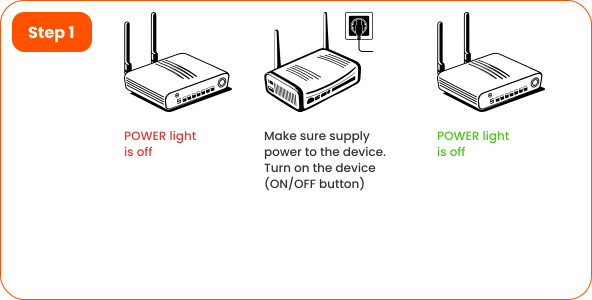
How to troubleshoot internet service
Recommendations
PROBLEM (Slow/unstable internet)
RECOMMENDATION

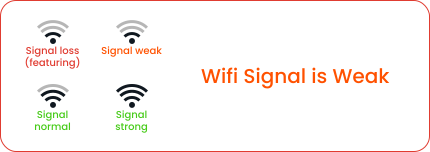
Ensure a smooth signal from the router device to the user, unobstructed by wall, metal doors,mirrors or similar things.
Adjust the antenna orientation to suit your needs or install more access point device(“MeshWifi” is a good technology to solve this problem).

Hot, moisture, and dust cause device stop working.
Ensure the location of the device is not hot (Do not put on TV, cooking area, sunshine, similar environment), no moisture(Waterarea), no dust.
Should turn o the device if you don’t use it.

Too many people (You may consider upgrading the service pack) or many unwanted users are using your Internet(Should change your Wifi password every 2 months).

Too many devices broadcasting wifi around your device in a narrow area leads to interference that affects your internet.
You can check by going to wifi on your smartphone, you will see a lot of strong wifi shows up.
With a complex Wifi environment, you should redesign your Wifi system to reduce interference.

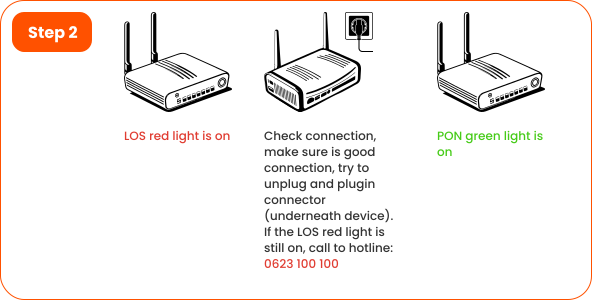
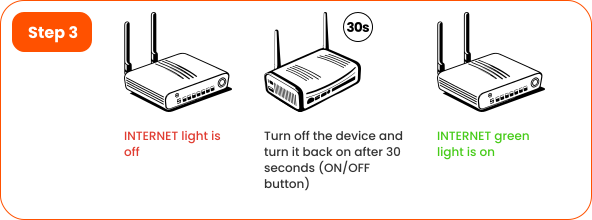
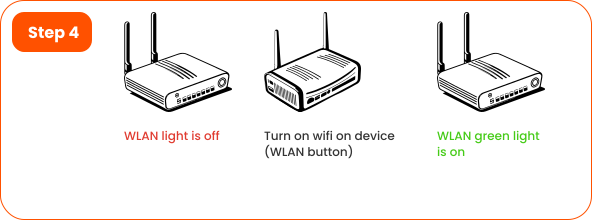
Follow the steps above to check power, cables, Wi-Fi signal, and device status.
Most common issues can be fixed in a few minutes.


If the problem cannot be resolved, please call our
Hotline: 0623 100 100 for immediate support.

Still looking for help?

FAQs
Support Online
Shop
VIETTEL TANZANIA PLC (HALOTEL)
  • Address: 10th Floor, Tanzanite Park, New Bagamoyo Road, P.O. Box 34716 Dar es Salaam
  • Email: info@halotel.co.tz
  • Hotline: 100
Product
  • 5G for Mobile
  • HaloPesa
  • HaloFiber
  • Corporate
Useful Information
  • News
  • Career
  • About Us
Follow us
  • Instagram
  • Facebook
  • Youtube
  • Tiktok
© Halotel 2025. All rights reserved.
About Us    |    Privacy Policy